
+36
Screen Recorder by Animotica - πρόγραμμα εγγραφής από οθόνη και webcam
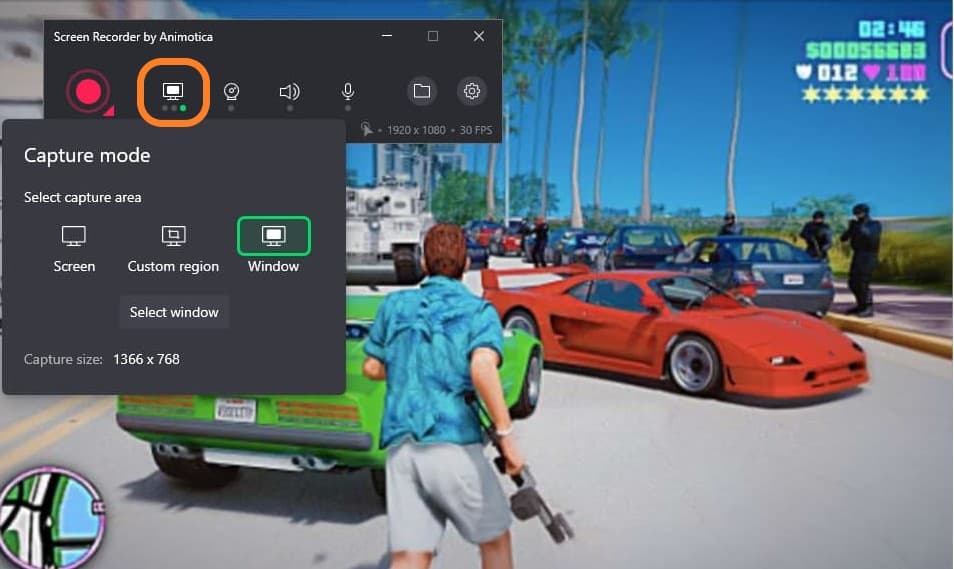
ΠΕΡΙΓΡΑΦΗ:Γενικά δεν ποστάρω μεμονωμένα προγράμματα που προσφέρονται δωρεάν για μικρό χρονικό διάστημα. Όπως θα δείτε ωστόσο από τη λίστα των χαρακτηριστικών, το συγκεκριμένο αξίζει. Μέσα από ένα πάρα πολύ απλό interface δίνει πολλές δυνατότητες εγγραφής του desktop (ολόκληρο ή συγκεκριμένη περιοχή), από webcam, ήχο εννοείται κλπ. Κάνει εγγραφή και από πολλαπλά displays!
Για πιο γρήγορα ανοίξτε το Microsoft Store στα windows και πάρτε το από εκεί. Έχετε και επιλογή να το αποκτήσετε χωρίς να το εγκαταστήσετε.
Φυσικά για πιο σοβαρή δουλειά υπάρχει το άριστο δωρεάν και opensource OBS αλλά έχει πιο πολύπλοκο interface, οπότε το συγκεκριμένο εργαλείο είναι βολικό για όσους ψάχνουν κάτι πιο απλό είτε λόγω εμπειρίας ή ταχύτητας. Σαν εναλλακτική επιλογή να αναφέρουμε βέβαια και το Xbox Game Bar που είναι ενσωματωμένο στα windows.
Record Screen Video: Capture gaming sessions, product demos, desktop windows, and more without memory limits. Recorded videos are stored in MP4 format.
Record Webcam Video: Capture webcam sessions. You can record your webcam videos alone or together with desktop window.
Playback Audio: Record or mute the sound from your PC along with the events on the screen.
Microphone Audio: Record or mute your voice during screen recording or webcam sessions.
Full Display Recording: Record the entire screen on your PC.
Custom Area Recording: Record a specific part of your screen by highlighting the area.
Multi-display Recording: Record multiple monitors/displays at once.
Record and Highlight Mouse Pointer and Clicks: Record the movement of your cursor across the screen and also highlight every click made on the screen.
Delayed Recording: Delay your recording by 2, 5, or 10 seconds after which your app starts recording.
Customize Webcam Overlay: Change the position of your webcam overlay in the video; adjust the horizontal and vertical offset, change the overlay size, add an overlay border and even change its color.
Record in Desired Quality: Set your desired video output resolution from 480p to 1200p. Record in up to 120 frames per second.
Quick Start with Hot Keys: Quickly start and stop your recording with Hot Keys – Alt + R to Start/Pause and Alt + S to Stop Recording.
Low CPU and Memory Usage: Record your screen without heavily draining your storage or CPU. You’re in control of the quality and size of your output video.
Edit Recorded Video for Free: Edit your recorded video for free using Animotica video editor.
Saving the Recorded Video on Your PC: Screen Recorder provides easy navigation through the recorded video with the option to play the video or edit it in Animotica.
Record your Twitch stream, a video from YouTube, Facebook, or any other website to share your experience with others.
Light and Dark Themes: Add a white or dark background to the screen recorder.
Select any Video or Audio Recording Device.
Time Bar - Keep track of your desktop video recording time.
Quality bar - Track the quality and resolution of the results file.
Δωρεάν
Συνδέσου ή δημιούργησε ένα λογαριασμό για να σχολιάσεις!
Σχόλια